Node is saved as draft in My Content >> Draft
-
How to Export Media Objects from PIM Media Manager ?
almost 10 years ago
Hello Readers, In this blog I am discussing about how we can Export information about Various Assets stored in PIM Media Manager System.
Export operation to export Medias Object from PIM Media Manager to Local system is processed with the help of XML Connector. Following are the steps we need to Perform :-
- Choose Master Data → XML connector Definition Management
- Then New Dialog Box will get Open.
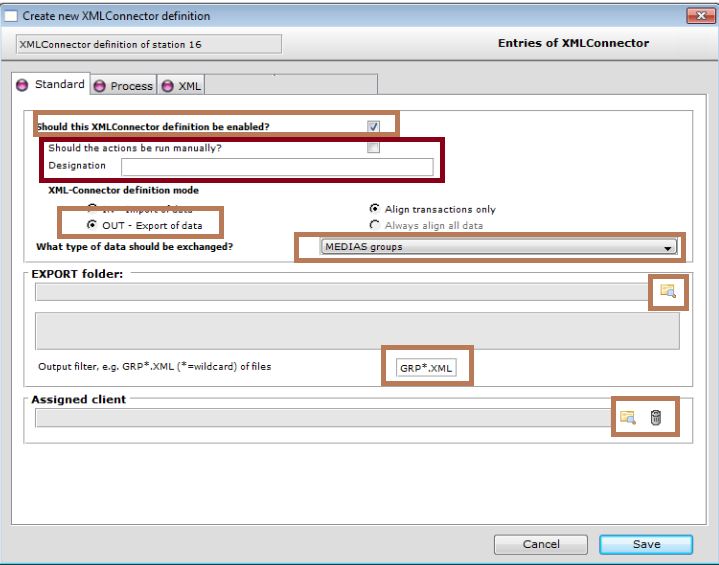
On the “Standard” tab.
- Activate this → “Should this XML connector definition be Enabled” -> In order to activate this Template for Export Operation.
- Enter The Designation. : So that this Template can be Identified within the System.
- As we are processing Export Operation, then under “XML-connector definition mode” You have to Select → “Out - Export of data”.
- Choose the type of Medias for instance, Medias Group.
- Specify the Designation of Export Folder. This Folder must be within PIM Media Manager Volume.
- Assign one of the Client that is configure in the PIM System.
On the Process Tab:
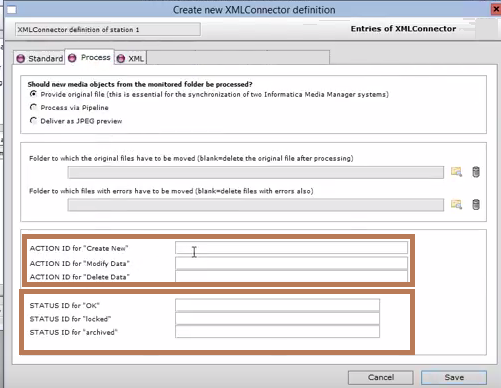
- In the “Action Id “ : Choose the Flag for New, Changed or deleted Groups for example : ”M” → Modify for Changed Group
- In the “ Status ID” : Choose the Flag for OK , Locked, Archived .
On the XML Tab:
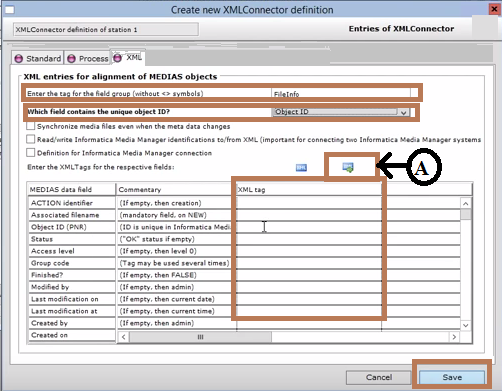
- Enter the Root Node in “Enter the tag for Field Groups”
- Select the Unique Object ID.
- Click on XML image (A – from Fig) to create an XML- output File
- Provide XML tags associated with the Medias Data Fields .
- Finally Click on Save
- Check the Schema from the “Schema Tab”
- Now Start XML Connector that will automate XML -Connector to start Exporting files in XML.
Image Source :https://kb.informatica.com/proddocs/
Thanks for Reading the blog...


 "Click to preview")
 "Click to preview")
 "Click to preview")

0 Comment(s)