-
String in C++
about 10 years ago
While perform manipulation with character or with string you need to do it with an char array for string or char variable for a single character.
This is the first way to manipulate the characters with char array.
char greeting[6] = {'H', 'e', 'l', 'l', 'o', '\0'};This is the way to manipulate the ire string with character array.
char greeting[] = "Hello";The memory representation of these looks like this.
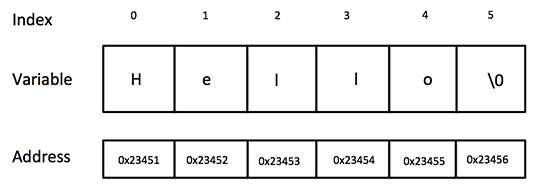
Actually, we don't place null at the last position of the string t. The C++ compiler automatically place '\0' at the end of the string when it initializes the array.
#include <iostream>

using namespace std;

int main ()
{
   char greeting[6] = {'H', 'e', 'l', 'l', 'o', '\0'};

   cout << "Greeting message: ";
   cout << greeting << endl;

   return 0;
}
We have many built in string functions.
S.N. Function & Purpose 1 strcpy(s1, s2); Copies string s2 into string s1.
2 strcat(s1, s2); Concatenates string s2 onto the end of string s1.
3 strlen(s1); Returns the length of string s1.
4 strcmp(s1, s2); Returns 0 if s1 and s2 are the same; less than 0 if s1<s2; greater than 0 if s1>s2.
5 strchr(s1, ch); Returns a pointer to the first occurrence of character ch in string s1.
6 strstr(s1, s2); Returns a pointer to the first occurrence of string s2 in string s1.


0 Comment(s)